
Precision Time & Analytics
Track every hour.Keep approvals flowing.
Time, timesheets, approvals, to-dos, time off and expenses in one app, and a portal where your clients send their requests. For consultancies and professional services teams.
No credit card. Every feature included. In six languages.
- Logged 3:30Production incident analysis, Customer Portal / Support, from request #12
- Approved Week 38by the project lead on Friday. The week is now locked.
- Reported 32:15 billableDetailed report for the client, exported to PDF with your logo
- Resolved for the client Request #12The client sees who resolved it and when, in their own portal

Everything a team needs to account for its time
From the first minute logged to the report your client asks for, with no spreadsheets in between. Grouped by the job you are trying to do.
Record
- Timer, manual or quick entry
- Type "Client call 14:00-15:30 yesterday" and it becomes an entry. Or start a timer, or fill in the form.
- Weekly timesheet
- An editable grid by day and project, with templates and copy from last week.
- Know where every hour came from
- Entries keep the to-do or client request they were logged for, in the list and in reports.
- Your day on one page
- The home page shows today's and this week's hours, to-dos due, what waits for your approval and who is away, with the month at a glance.
Organise work
- To-dos for you and your team
- Personal lists, a shared queue per group, work handed over between colleagues, and hours logged when you finish.
- Quick capture
- "Review proposal tomorrow 15h p1" sets the date, time and priority as you type. Send any to-do to Outlook or Apple Calendar.
- Closed, not lost
- Search finished and cancelled to-dos by text, project and closing date.
- To-dos by email
- Send an email with your personal tag in the subject and it becomes a to-do, with the email text as its description.
Approve
- Approval per project
- Each project lead approves the hours on their project. An approved week stays locked until it is reopened.
- Expenses through to payment
- Each person has their own approvers for time off and expenses. Once an expense is approved, the approver records the payment with a date and reference, and the person is told it was paid.
- One inbox
- Approvers see everything waiting for them in one place, and can approve it all at once.
Plan absences
- Absence types you define
- Vacation and sick leave, plus your own types with a code and colour.
- Vacation allowance
- Days per year with carry-over and a cap. Everyone sees their balance as they ask.
- Holidays by location
- Calendars per office, region or municipality. Holidays never count as days off.
Report
- Summary, detailed and weekly
- By client, project, person or tag, billable hours apart. PDF and Excel carry your logo on every page; CSV too.
- Expense report
- Your own or your team's, by month or year: awaiting approval, to pay and paid, with totals per currency.
- Annual absence map
- A PDF to post on the wall, or a per-person year with balances for management.
Run the team
- Roles, groups and private projects
- People see only the projects and reports that concern them.
- Workspaces, languages, formats
- One sign-in for several companies or teams. English, Portuguese, Spanish, French, German or Dutch, regional formats, light or dark.
- Team news
- A bar at the bottom of the app with notices for everyone or for chosen groups, marked urgent, warning or message. You decide who else may publish.
- Notifications in the browser
- The bell's alerts reach you even with iTrackFlow closed, in Chrome, Edge and Firefox. Not on iPhone or iPad.
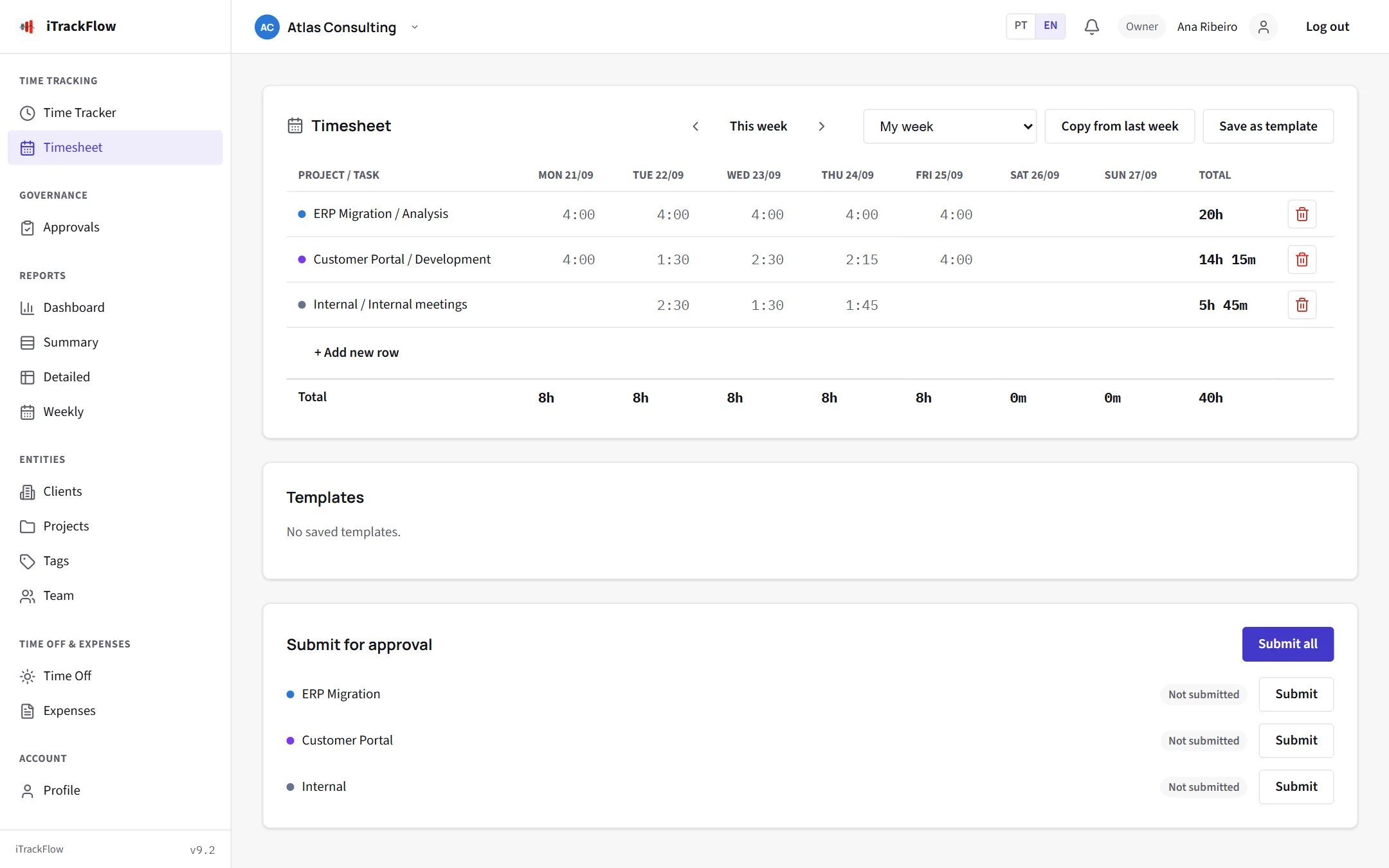
The whole week at a glance
Each project by day and the week's total. Type hours straight into the grid and submit everything for approval at once.
- Templates with your usual projects
- Copy last week in one click
- Approval status for every project
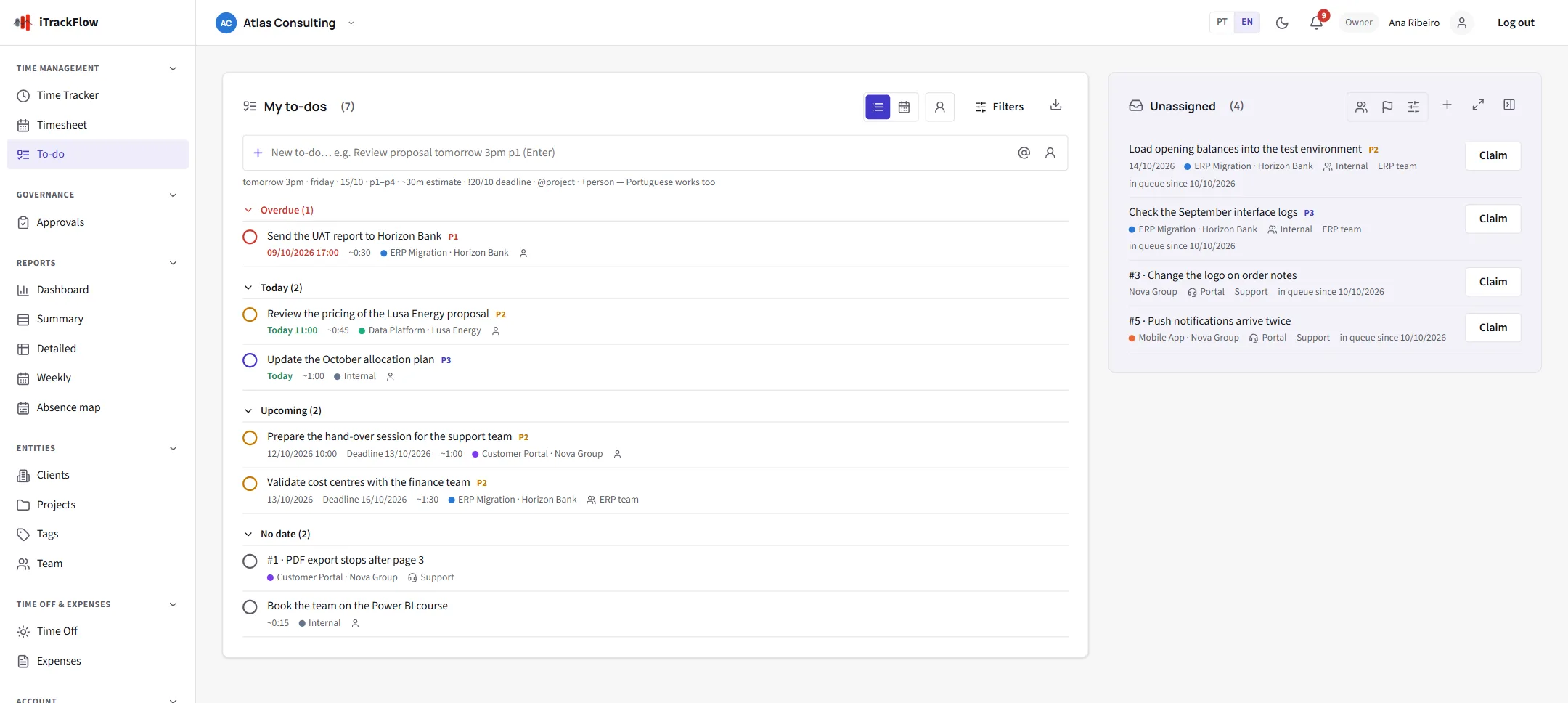
A to-do list that ends in a timesheet
Take a request from your group's queue, work on it, and when you tick it off the hours are offered for the right project. Nothing to copy across.
- Shared queue per group, claimed in one click
- Team leads assign and follow up
- Overdue, today and upcoming, by date
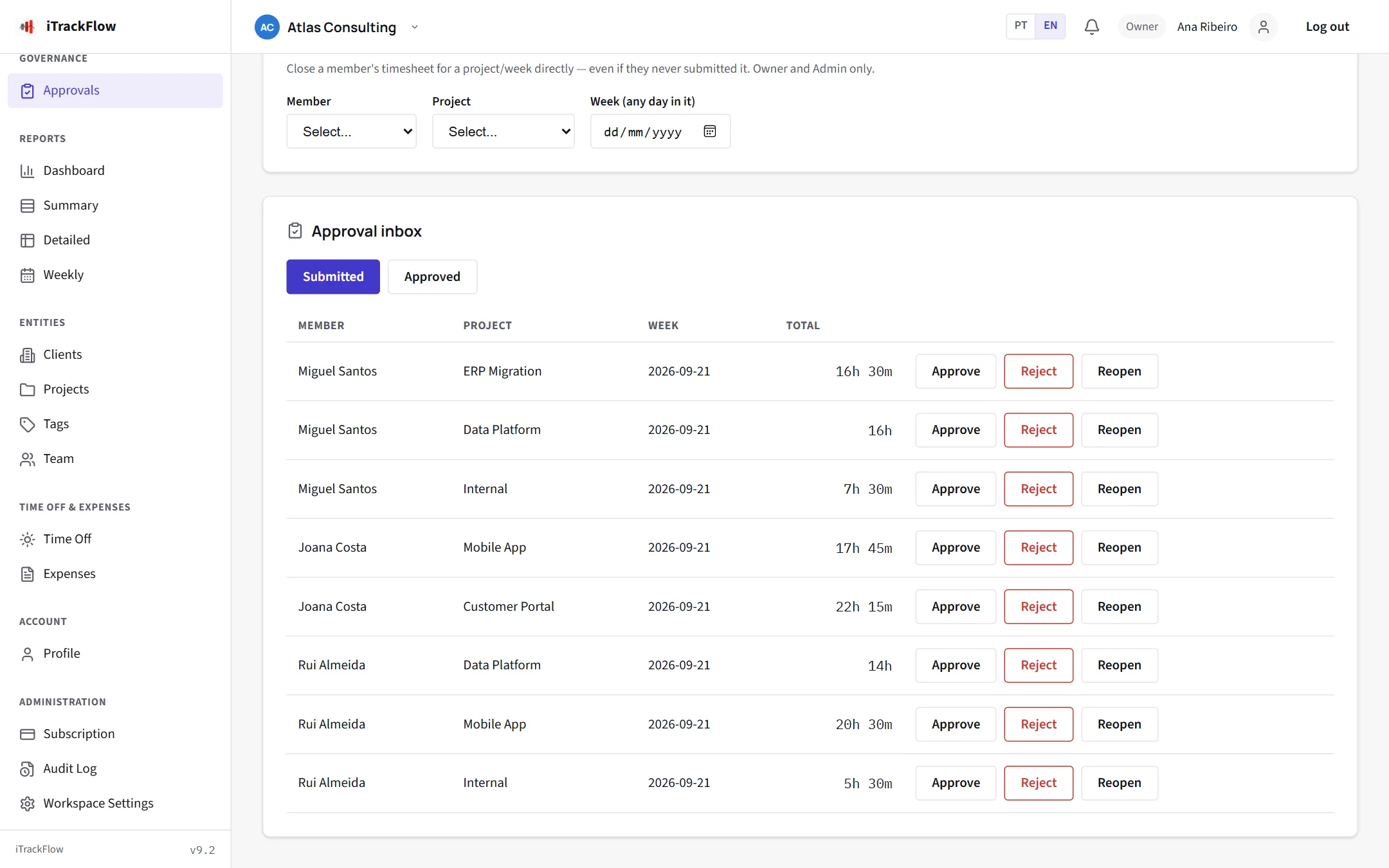
Approve without chasing anyone
Approvers see the timesheets, time off and expenses waiting for them in one inbox. Whoever submitted gets the answer by email.
- Approvers per project, time off and expenses
- Rejection with a reason, controlled reopening
- Email notifications each person can turn off
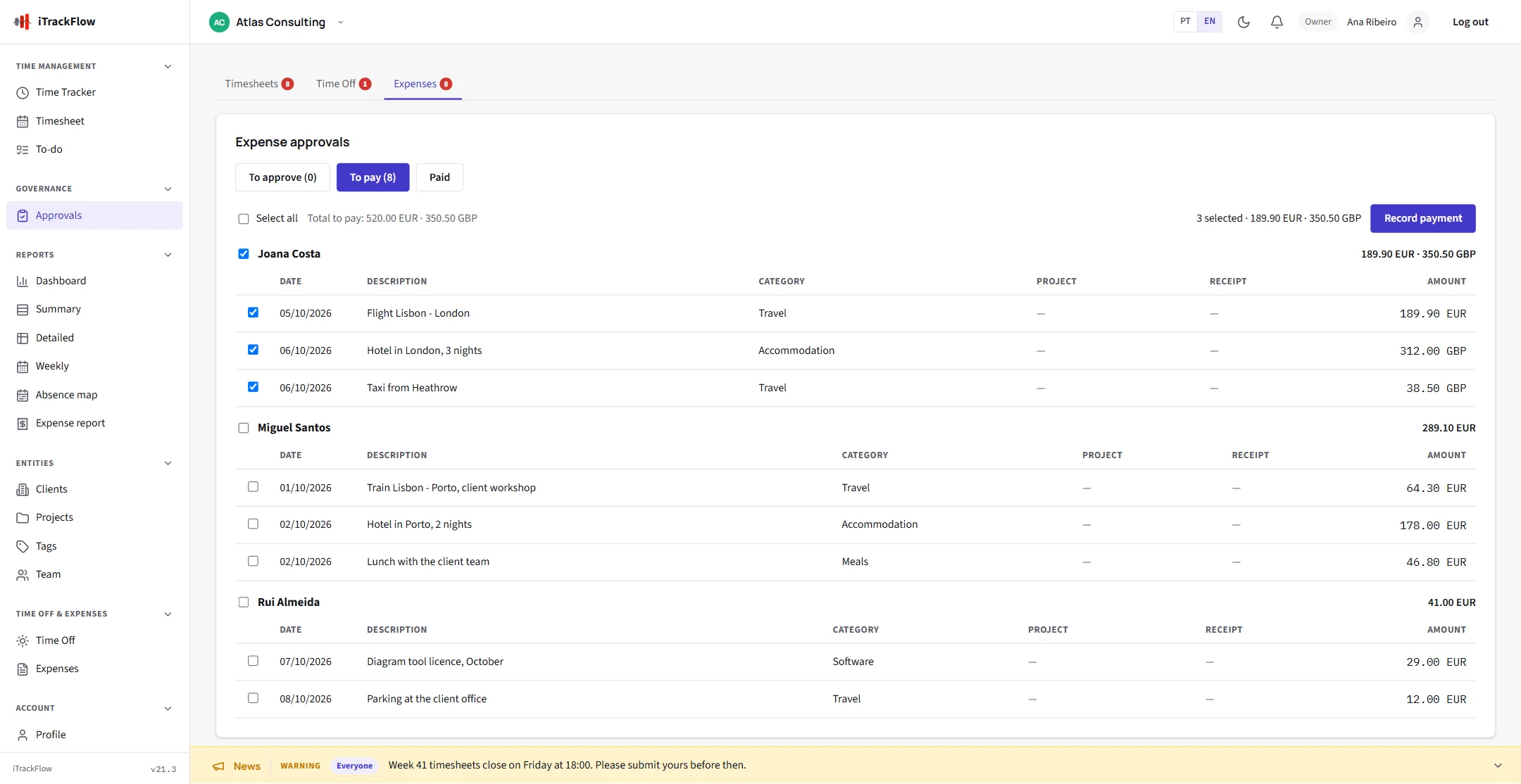
From receipt to payment
Approved expenses wait in the approver's "to pay" list, grouped by person. Pay several at once, and everyone can see what is pending, to pay and paid.
- Payment date and reference on every expense
- The person is notified by email and in the app
- Monthly or yearly report per currency
See who is away, all year
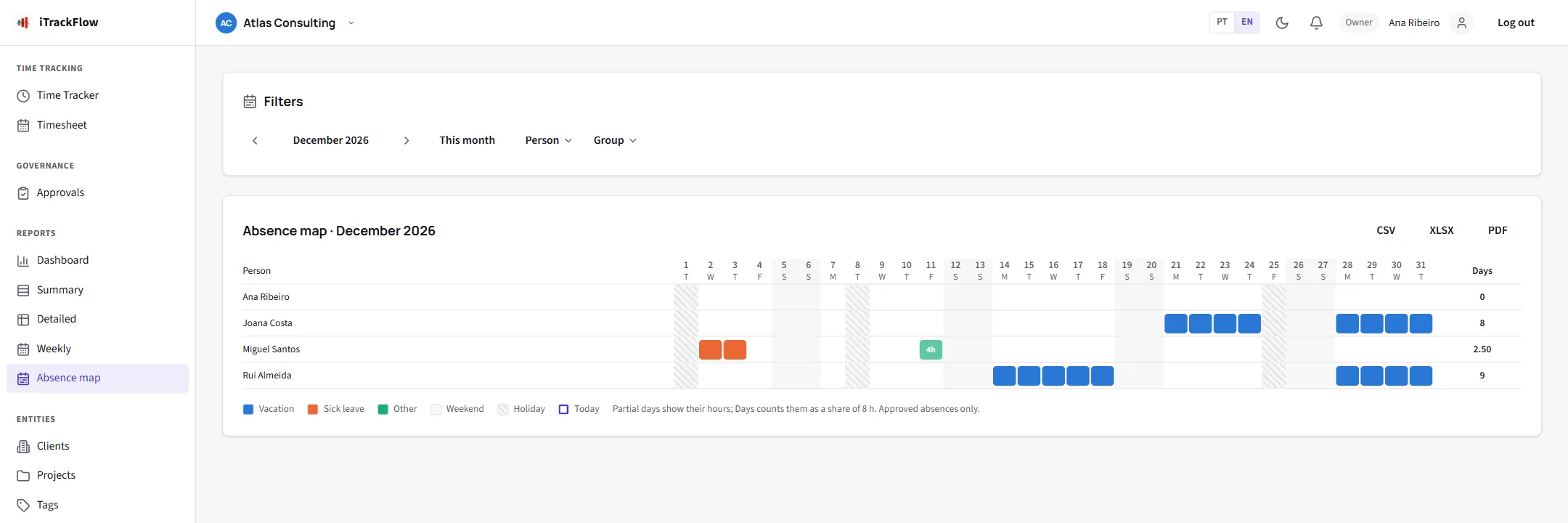
The absence map shows the team month by month with each person's holidays. Print the year for the wall, or keep the management view with balances.
- Holiday calendars per office or region
- Vacation allowance with a live balance
- Absence types visible only to administrators
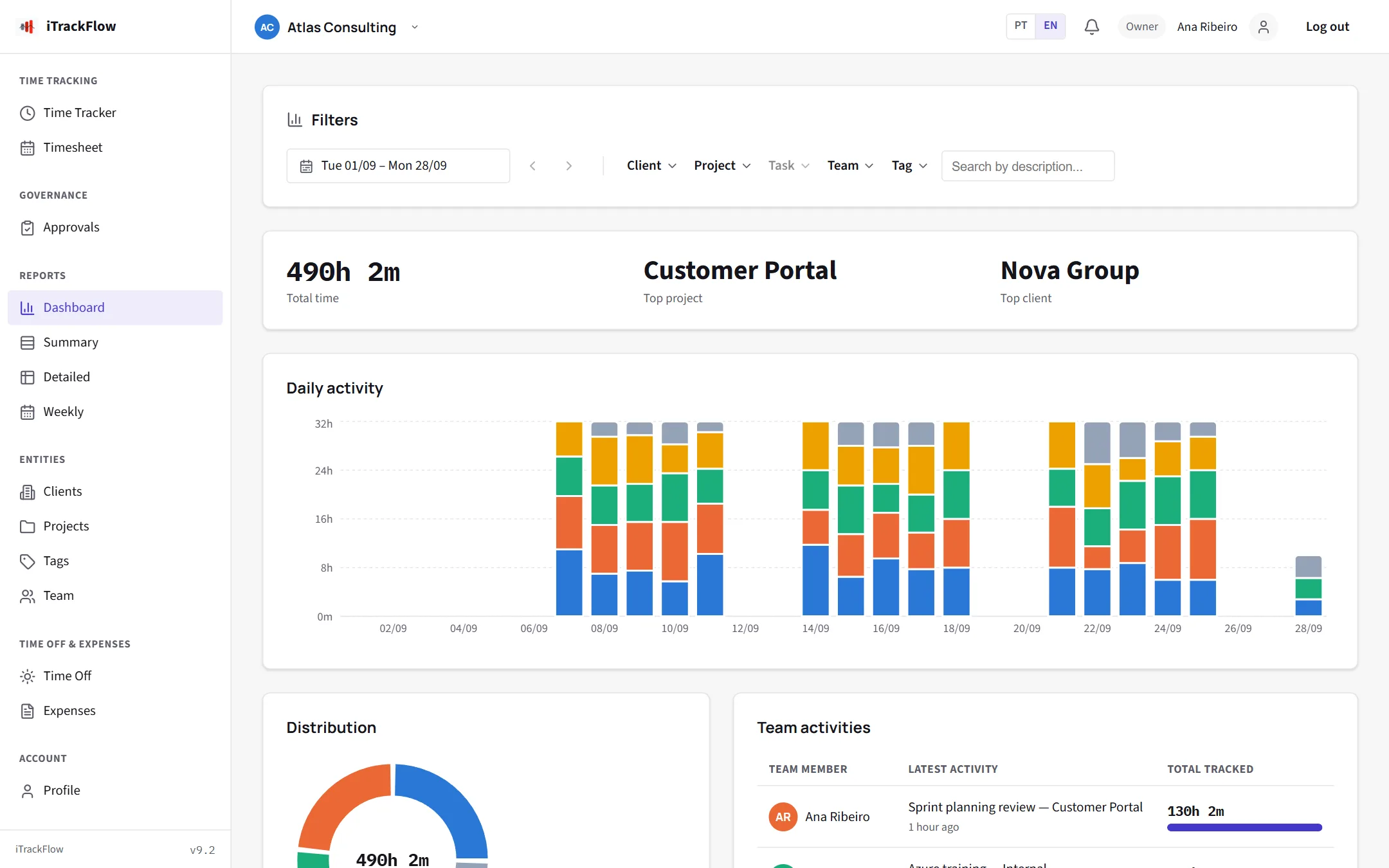
Numbers ready for the meeting
Where the time went by client, project or person, billable hours apart, and a report in the format your client asks for.
- Filters by period, client, project, task, person and tag
- PDF and Excel with your logo
- Everyone sees only what concerns them
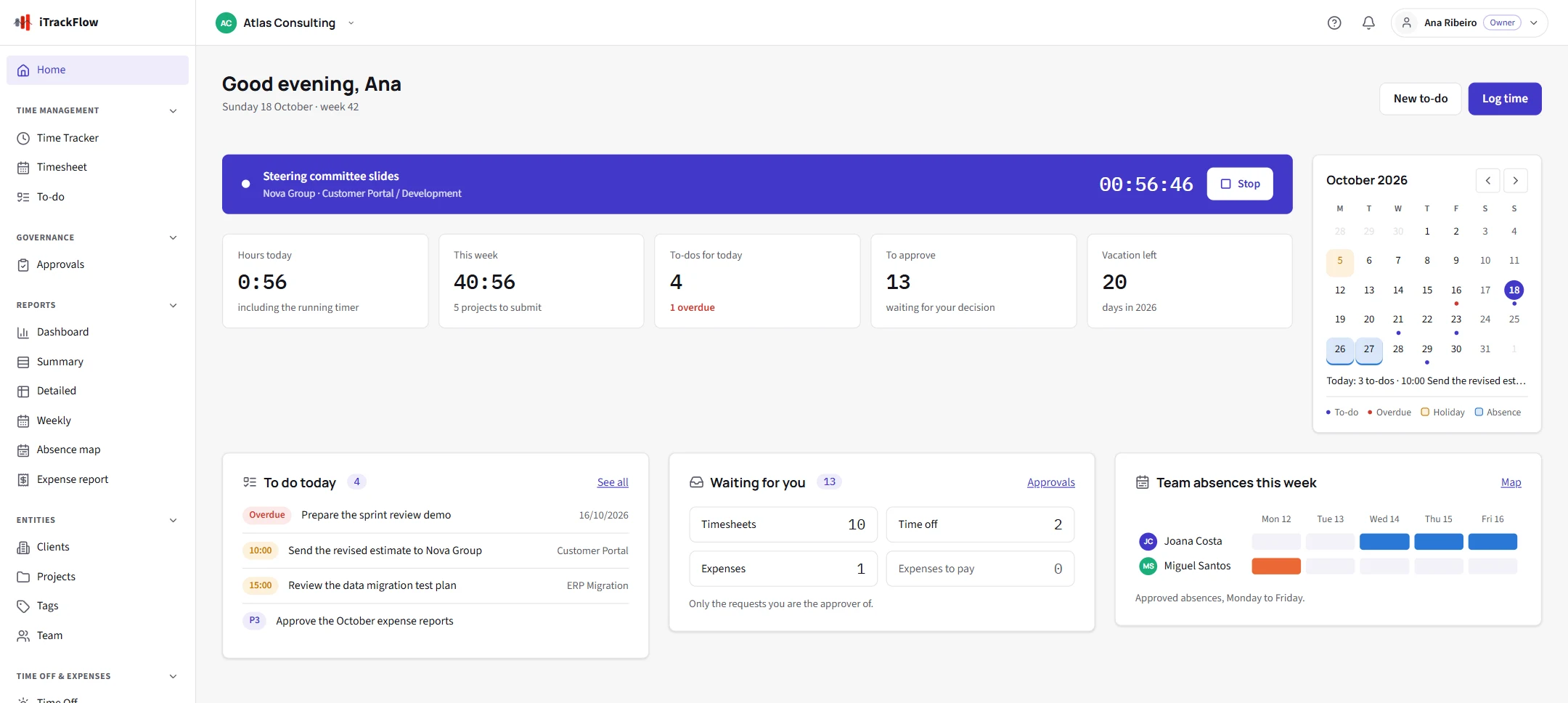
Your day at a glance
The home page gathers what needs you today: the running timer, the hours of the day and the week, to-dos due, what waits for your approval and who is away, with the month beside it.
- Resume your last entry in one click
- Overdue to-dos and pending requests stand out
- A calendar with your to-dos, holidays and days off
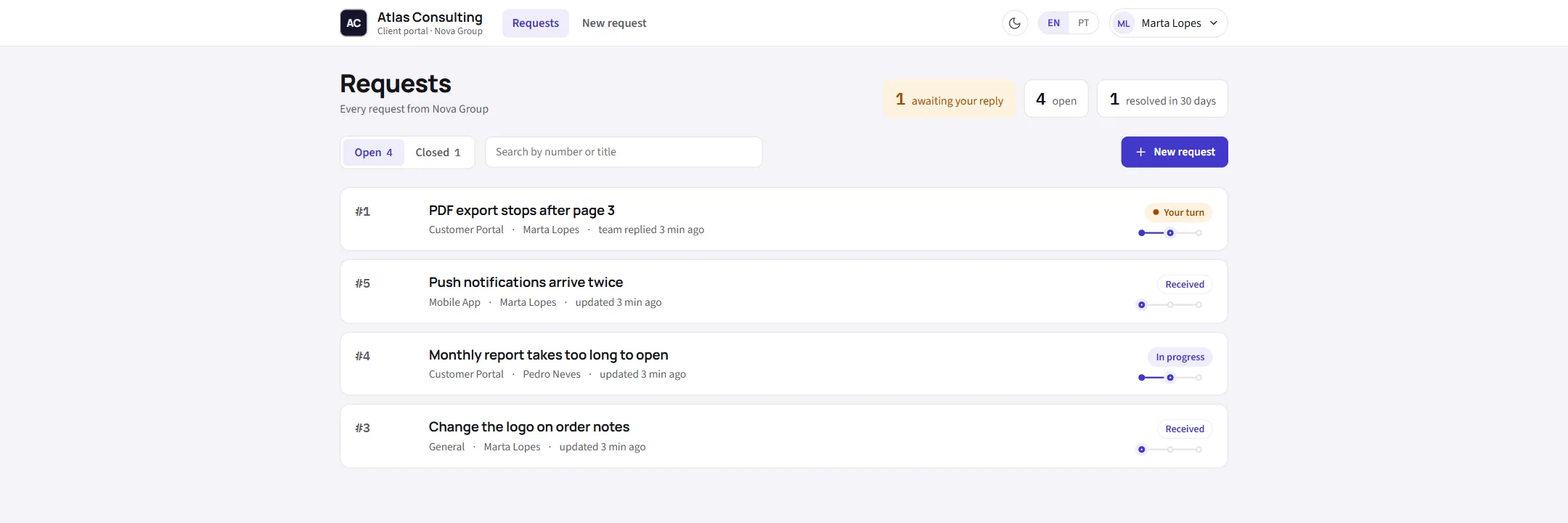
Client portal
Give your clients one place to ask
No more requests lost between email, phone and chat. Your clients open them in a portal with your name and logo, or by email with a personal tag, and each one lands in the right team's queue as a to-do.
Routed to the right team
Each project has a support group. A request becomes a to-do in that group's queue, and the hours spent on it are traceable.
A conversation, not a ticket number
Clients follow the status and talk to your team. They see who resolved it and when, if you choose to show it, and rate the answer from one to five stars.
Your clients decide who asks
Invite contacts per client. Client managers see every request of their company; contacts see their own.
Up and running in an afternoon
Three steps from sign-up to the first approved week.
Create your account
Enter your company name and confirm your email with a code. Your workspace is ready straight away.
Set up and invite
Add clients, projects and approvers, import your holiday calendar and invite the team by email.
Track, approve and export
The team logs its hours, leads approve them and the reports are there whenever you need them.
Your data, protected by default
Security controls in every account, with nothing extra to set up.
Plans that grow with your team
Every plan has every feature, the client portal included. Plans differ only in how many people, how much storage and how many client portal users they include.
Free Trial
Freefor 30 days
No credit card
| People on the team | 5 |
| Storage | 500 MB |
| Client portal users | 10 |
Starter
€18per month
or €205.20 a year, save 5%
| People on the team | 10 |
| Storage | 1 GB |
| Client portal users | 25 |
Team
€42per month
or €468.72 a year, save 7%
| People on the team | 25 |
| Storage | 3 GB |
| Client portal users | 50 |
Business
€78per month
or €842.40 a year, save 10%
| People on the team | 50 |
| Storage | 10 GB |
| Client portal users | 100 |
Prices per account, excluding VAT. Need more people, storage or portal users than a plan includes? Extras can be added to any paid plan.
Common questions
Do I need a credit card to try it?
No. Create your account and confirm your email. The trial includes every feature for 30 days.
What happens after 30 days?
Choose a plan in the app and pay by card, monthly or yearly; everything you recorded stays as it is. If you don't, the account owner can still read and export everything for 30 days.
Do my clients pay for the portal?
No. Portal users are part of your plan; your clients only need the invitation you send them.
Can clients send requests by email?
Yes, if you turn it on. Each portal user gets a personal tag; an email with that tag in the subject becomes a request in the portal, with the same confirmation as one made in the portal.
Can I export my data?
Yes. Reports export to PDF, Excel and CSV, and to-dos export too.
Does iTrackFlow pay the expenses?
No. You pay as you do today, by transfer for example, and record the payment in iTrackFlow so the person knows and the report adds it up.
Does time off take public holidays into account?
Yes. Each person follows the holiday calendar of their office or region, and holidays never count as days off.
Which languages can my team use?
English, Portuguese, Spanish, French, German and Dutch. Each person chooses their own; emails, notifications, exports and the client portal follow it, and the in-app help and guided tours exist in all six. The legal documents are in English and Portuguese.
Ready to leave the spreadsheets behind?
Create your account in minutes, or write to info@itrackflow.com for a demo.